

Chopz is designed as a web-based platform, which means you do not need to install any mobile application.
You can access Chopz using your web browser on:
This allows you to use Chopz instantly without downloading anything.
Benefits of using Chopz in a browser include:
Add Chopz to Your Home Screen
For a faster and more app-like experience, you can add Chopz directly to your device home screen.
Once added, Chopz can be opened just like a normal mobile app with a single tap.
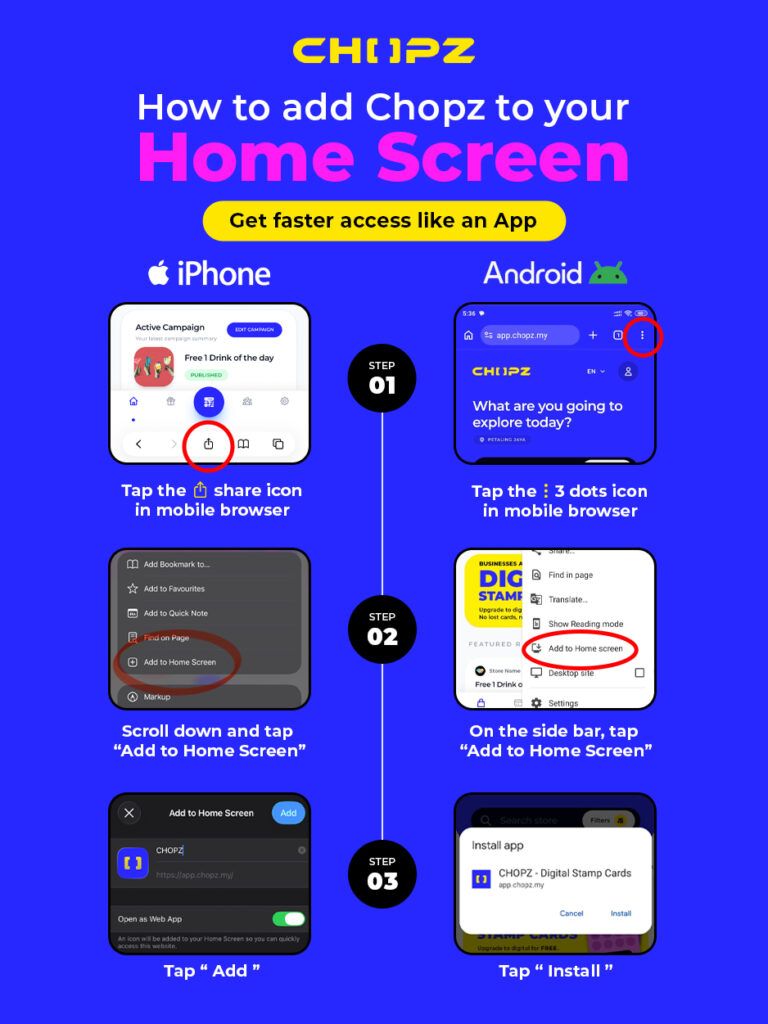
On iPhone (Safari)
- Open Chopz in Safari
- Tap the Share button
- Select Add to Home Screen
- Tap Add
On Android (Chrome)
- Open Chopz in Chrome
- Tap the Menu (⋮) button
- Select Add to Home screen
- Tap Install or Add
Why Add Chopz to Your Home Screen?
- Faster access to your account
- Open Chopz like a mobile app
- Quick access to rewards and campaigns
- Easier QR code scanning in stores
- Better overall user experience
Advertisement